0
Table of Contents
What is a UX discovery, and how do we perform it at Merge?
UX discovery brings research, planning, and creative thinking together before design. Here’s how we use it at Merge to agree on problems and priorities.
UX discovery is the early work of understanding a product’s users, the problems they need to solve, and the business and technical constraints around them. Your team will then use the findings to agree on priorities and decide what to work on next.
When thinking about digital product design, we often like to paint a picture of a continuous creative flow that starts the moment a project begins. Great design doesn’t just come out of nowhere, though. It starts with thorough research, methodical planning, and bursts of thoughtful creativity.
At Merge, we bring those activities together in our Product UX Discovery work. Each product has its own questions, so the scope changes with the project. Below is how our discovery process connects those questions to priorities, product structure, and the next design decisions.
What exactly is a product UX discovery phase?
Discovery brings together the information you need to make the next product decision, and that includes:
- The problems and user pain points the product should address.
- The tasks users need to complete, and the outcomes stakeholders want to achieve.
- Business goals, technical constraints, and a way to recognize progress.
- Direct and indirect alternatives, including the workarounds people use today.
- An initial direction, the assumptions behind it, and the questions still worth investigating.
Nielsen Norman Group describes discovery as early investigation into the problem and the evidence needed to decide what comes next.
At Merge, the engagement described here also extends into information architecture, user flows, and wireframes. Agree on that boundary when you scope the work, since teams can use the same word for different amounts of design preparation.
Discovery starts with assumptions about user needs, business priorities, and product behavior. We record which claims have supporting evidence and which need investigation. Exploring a problem and testing a proposed interface answer different questions, so the research method should fit what you need to learn.
The work involves people who understand different parts of the product: stakeholders, a product owner, designers or researchers, and someone who can explain the technical constraints. Support, sales, marketing, and operations can contribute useful context, too. Users bring evidence about their own needs and behavior when user research is included in the scope.
When should you start UX discovery?
Discovery is useful when you’re starting a new product, planning a substantial redesign, or trying to move forward with unclear scope and competing priorities. Before committing to a direction, work out whose task is difficult, where the difficulty occurs, and what an improvement would mean.
Next comes agreeing on the decision you need to make, who owns it, and what constraints the team must work within. Then, gather existing research, analytics, support feedback, product documentation, and access to the people who can help answer the questions. For a new product, some of those inputs will be missing. Record the gaps so they can shape the research plan.
Our product UX discovery process
Our process covers eight areas, with the UX audit applying when there’s an existing product to review. While the depth of each area depends on your questions, available evidence, and agreed scope, we also revisit earlier decisions as we learn more along the way.
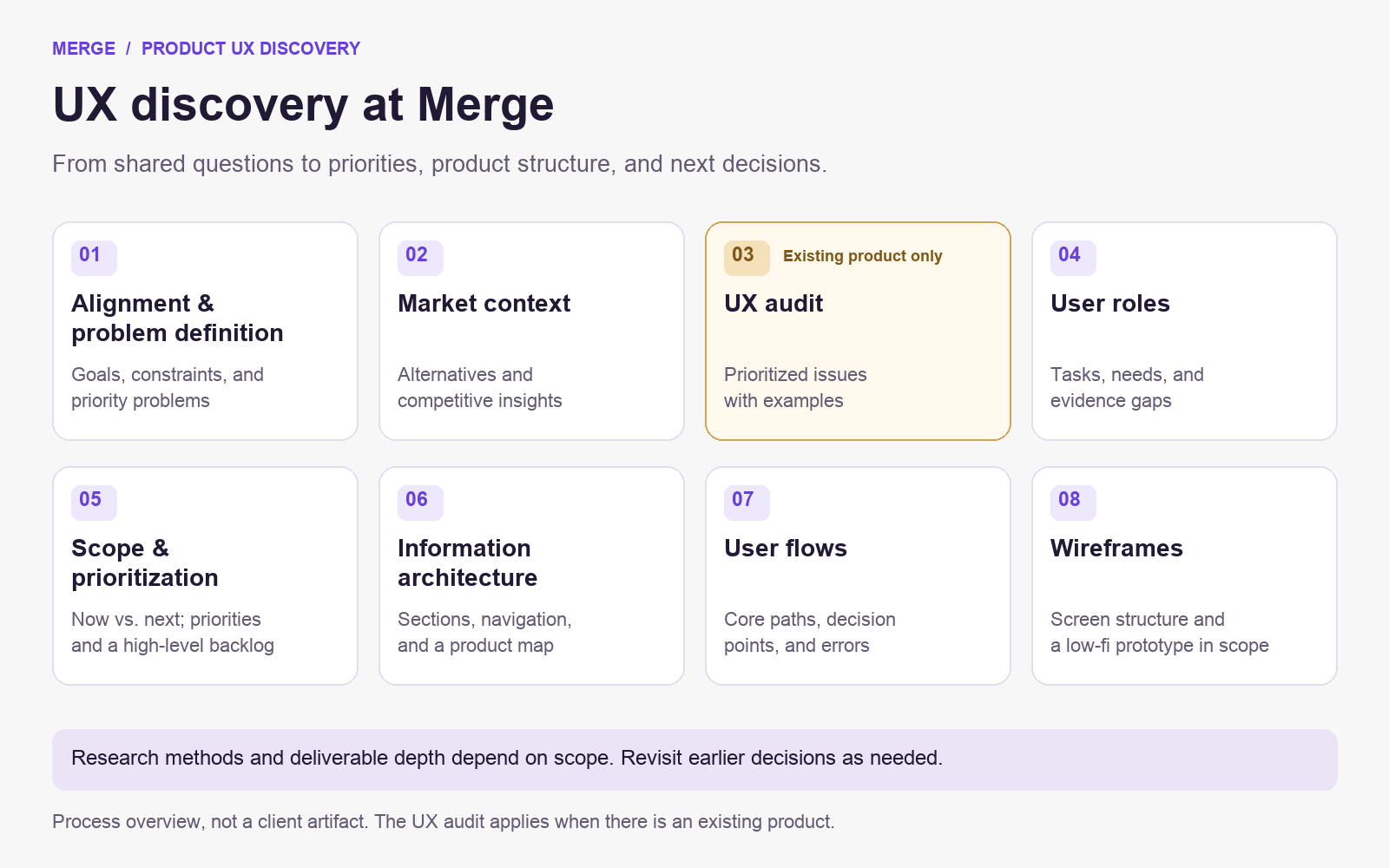
Alignment and problem definition
We begin with a stakeholder workshop to understand the company, its users, and the problems the project should address. A facilitator helps the team compare perspectives, capture disagreements, and define success criteria. We frame that discussion around a “company–users–competitors” triangle: what the business wants to achieve, what users need to do, and which competing products or workarounds they can choose.
The workshop questionnaire provides a useful starting point for that conversation, and then we adapt it for a new product or a redesign, covering:
- Company and product: your mission, goals, positioning, monetization, current or planned features, and the problems you want to solve.
- Product metrics: the measures relevant to this decision and their current baselines, where available. These might include conversion, retention, churn, monthly recurring revenue, customer acquisition cost, daily active users, bounce rate, satisfaction, or willingness to recommend the product. Choose the ones that actually fit the question.
- Target audience: roles, responsibilities, goals, motivations, pain points, accessibility needs, and the setting in which people use the product. Demographic details such as age, gender, income, or family circumstances belong here when they affect the experience.
- Existing users: their main touchpoints and tasks, how they find the product, how they use it, and what available feedback says they like or struggle with.
- Competitors and alternatives: direct competitors, indirect options, relevant features, and the reasons someone might choose an alternative.
- Required changes and constraints: desired improvements, technical inputs, budget and timing boundaries, dependencies, and earlier attempts to solve the problem.
The workshop leaves us with shared project context, success criteria, initial user segments, and a prioritized set of problems. We also keep stakeholder knowledge and assumptions identifiable so the next research step can address the gaps.
Market context and competitive analysis
The competitor information from the workshop is a starting point for a closer look at the market. We examine relevant products, their distinguishing features, and the strengths and weaknesses that matter to your users’ tasks.
Direct competitors offer a similar product to a similar audience. Indirect alternatives help people achieve the same goal another way: a spreadsheet or a manual process may be part of the picture. We consider products that could become closer competitors as your scope develops, too.
The findings go into competitive notes or a report with implications for your project. A familiar pattern can be something worth considering, while a confusing one gives you something to investigate. Seeing a feature on a competitor’s screen tells you what exists; you still need evidence that it fits your users.
In our Waffly project, for example, discovery included stakeholder interviews and focused competitor research. Those are the specific discovery activities documented in the case study.
UX audit, when there is an existing product
If a product has a confusing interface, it may well be in need of a UX audit.
For an existing product or a redesign, we review the agreed key flows for errors, inconsistencies, friction, accessibility concerns, and opportunities to improve the experience. Analytics, support feedback, and earlier research can help put the observations in context. An expert review can identify a likely usability problem; user evidence is needed to establish how people actually experience it.
The output is a prioritized set of issues and improvement opportunities, with examples that explain the problem. The review covers the agreed scope for that specific project, rather than automatically examining every screen and interaction.
For a product being built from scratch, there’s no existing interface of its own to audit. Instead, we focus on user roles, current journeys or workarounds, business goals, and the problems the new product should solve.
If you’re preparing to do this work with your own team, our Product UX Discovery Kit provides a place to explore the methods and templates.

Target personas and user roles
Next, we describe who will use the product and what matters to each role – stuff like their tasks, motivations, pain points, use cases, context, and possible objections.
For a B2B product, the person buying the software, the person administering it, and the person using it every day may very well have different needs. Defining those roles helps the team see which scenarios deserve attention and whose input is still missing.
The resulting profiles should show their evidence basis. A persona assembled from stakeholder knowledge is a working assumption until research supports it. Interviews, observation, and existing research can help refine that picture when they’re available or included in the engagement.
Scope and prioritization
We bring together ideas, audit issues, research findings, and feature requests, then decide what belongs in the next iteration and what can wait. Dependencies, business goals, the severity of a problem, its frequency, and the available evidence are all quite useful in informing that decision.
Basic ideation helps us explore possible directions through brainstorming, quick sketches, paper prototypes, and storyboards. For an existing product, two questions remain particularly useful:
- Which feature or product attribute helps users most with their task?
- What holds them back when using the product or a particular feature?
We group related problems and ideas so the team can compare them. Must, Should, Could, and Won’t categories help make the scope explicit for the release being discussed, including what stays out for now.
The output is a prioritized scope and a high-level plan or backlog: a structured list of tasks, bugs, updates, and proposed features, with the reasons for their priority.
Ideas that start out rough and a bit fuzzy become clearer pieces of work as we connect business objectives, user scenarios, and dependencies. Some items will still need investigation or an estimate, though, before anyone can commit to delivery.
Information architecture
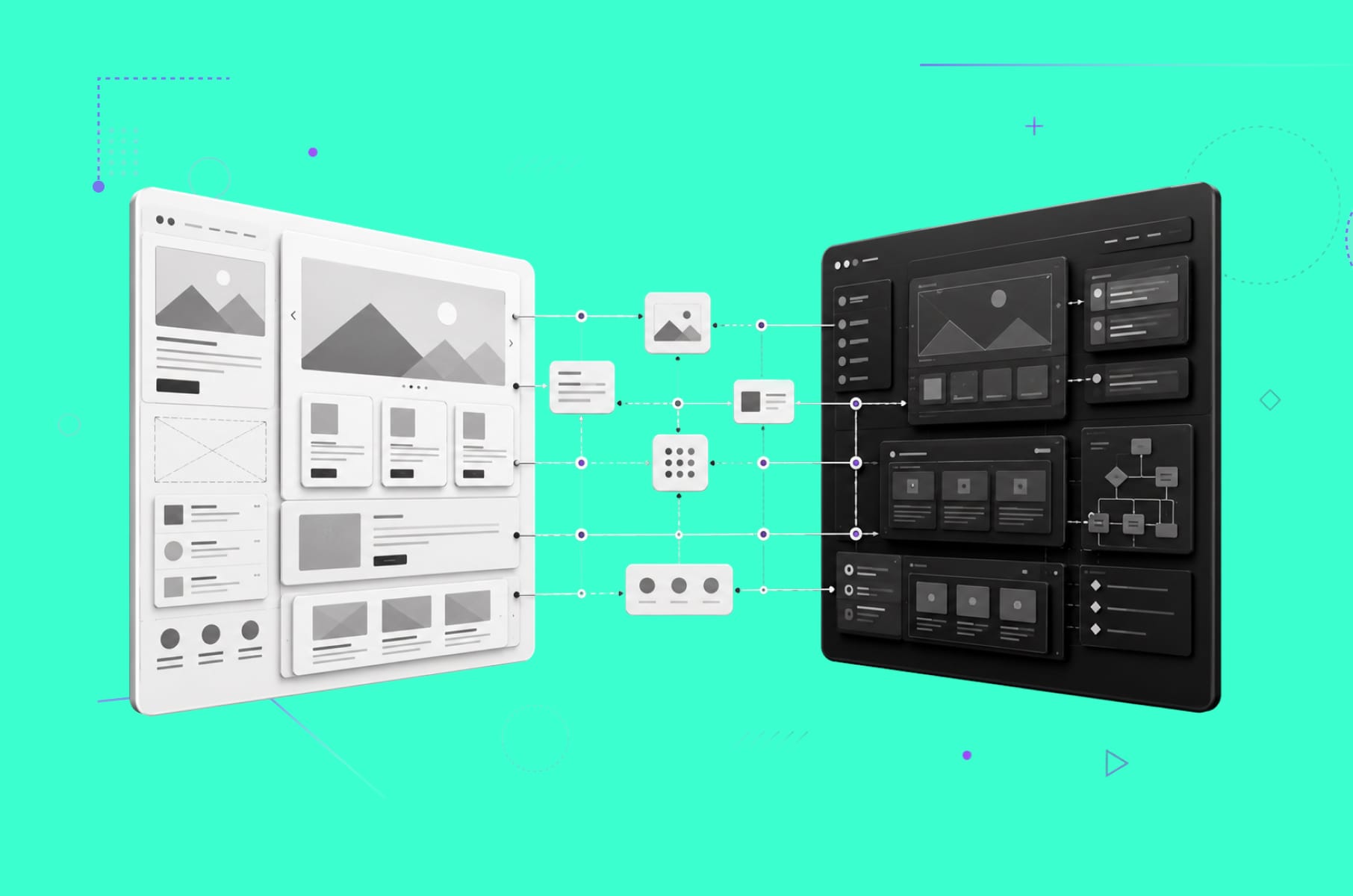
Once the scope is clearer, we organize the product’s sections, navigation, hierarchy, and content. Information architecture gives those parts a structure people can work through. Using the chosen scenarios and user roles as inputs, we create a sitemap or product map. That lets the team discuss where information belongs, how sections relate, and whether the structure supports the tasks in scope before detailed screen design begins.
User flows
User flows describe how someone completes a core scenario. Starting with the agreed roles, scope, and product structure, we map the steps, decision points, error states, and alternative routes. Designers and engineers can use these diagrams to review permissions, error recovery, and alternative routes alongside the main path.
Wireframes
Wireframes turn those decisions into screen structure: content, controls, hierarchy, and the way screens connect. Early sketches, storyboards, or paper prototypes can help explore options before we refine the chosen direction.
Depending on scope, the wireframes may be connected into a low-fidelity interactive prototype. This gives the team something concrete to review and provides a foundation for UI design and engineering estimation. A clickable prototype still needs appropriate testing before you can describe its usability as validated.
UX discovery deliverables and the decisions they support
The core outputs of this Merge workflow cover the goals, users, problems, scope, and proposed product structure. Agree on their depth before starting; the same deliverable name can describe quite different amounts of work.
| Output | Decision it supports | Limit to keep in mind |
|---|---|---|
| Product goals and success criteria | What should this work achieve, and how will we assess progress? | A target is an intention, with a baseline needed for later comparison. |
| Key use cases and user scenarios | Which tasks should the product support? | Scenarios need an identifiable source; some may begin as assumptions. |
| Competitive research and market insights | Which alternatives and patterns should inform the direction? | A competitor’s feature alone doesn’t establish a user need. |
| Prioritized problems and opportunities | Which problems deserve attention first? | Priorities can change as evidence improves. |
| Target personas or user roles | Whose needs and permissions shape the experience? | Stakeholder-defined profiles need further research where evidence is missing. |
| Scope, priorities, and a high-level backlog | What belongs in this iteration, and what comes later? | Detailed estimates, release commitments, and a complete roadmap require further work. |
| Information architecture or sitemap | How should sections, navigation, and content relate? | The proposed structure may need evaluation with users. |
| User flows | How should core scenarios, branches, and errors work? | The diagrams cover the scenarios agreed in scope. |
| Wireframes and, where agreed, an interactive prototype | How do the decisions translate into screens? | Fidelity, coverage, and testing depend on the engagement. |
Conditional outputs include a UX audit, jobs-to-be-done (JTBD) snapshots, and user interview or usability-testing findings. Include those when they answer the project’s questions and the work has been agreed. Report testing findings only when testing has actually happened.
Consider a hypothetical B2B SaaS example where a team asks for a new dashboard. Discovery would examine what each role needs to do and what evidence exists about the current difficulty. Suppose the team chooses an overdue-approval scenario to explore. It can define the first-release scope, map the approval flow, and sketch a wireframe around that task, while recording the assumption that approvers need a daily overview. That assumption remains a research question until we validate it with the relevant users.
How UX discovery differs from user research and a UX audit
These activities work together, with different jobs:
| Activity | Main purpose | Relationship to discovery |
|---|---|---|
| UX discovery | Establish the problem, direction, priorities, and next decisions. | Brings together business, user, market, and technical context. |
| User research | Gather and analyze evidence about users, their tasks, and their experience. | Can inform discovery and continue as the product develops. |
| UX audit | Evaluate an existing experience for usability issues and opportunities. | Can contribute to discovery for an existing product or redesign. |
During discovery, we use audit observations and user-research findings alongside business goals and technical constraints to decide which problems to tackle and how much work to commission.
What happens after UX discovery?
By the end, the team should be able to explain the chosen problem, who it affects, what the evidence supports, what remains assumed, and what is in scope. The backlog and supporting artifacts should make the next decision easier to discuss, with an owner for the unresolved questions.
The next step may be additional research, concept evaluation, UI design and engineering estimation, or a change in direction. GOV.UK’s discovery guidance explicitly includes deciding whether to continue. Its government delivery phases have their own context; the useful principle here is to make that decision deliberately.
Keep the remaining risks and dependencies visible as the plan develops. A high-level roadmap can describe a proposed sequence, with detail and commitments added as the work is investigated and estimated. And be sure to record any questions that need further research before implementation.
Frequently asked questions about UX discovery
How long does UX discovery take?
For the Merge engagement described here, 1–3 weeks is a typical planning range, depending on complexity, scope, and available inputs. Confirm the schedule for your project, especially when recruitment or new research is needed. Other teams may define discovery differently and use a different timeframe.
What should you prepare for a UX discovery workshop?
Bring your business goals, current product materials, known constraints, relevant metrics, and any research or support feedback you already have. Include people who can explain product decisions and technical dependencies, and identify who can approve the next step. A list of unanswered questions is useful preparation, too.
What questions should you ask during UX discovery?
Start with who needs help, what they’re trying to do, how they do it today, and where they struggle. Then ask what evidence supports that picture, what limits the possible solutions, and what the business wants to achieve. Finish by agreeing which uncertainty the team needs to investigate first.
Does every UX discovery need user interviews?
Choose methods around the uncertainty and the evidence you already have. Interviews can help you understand users’ needs and context; existing research, observation, analytics, and support records can also contribute. GOV.UK’s user-research guidance describes several of these options. If direct user research is outside the agreed scope, keep the evidence gaps explicit and plan how consequential assumptions will be checked.
Can you run UX discovery for an existing product?
Yes. A redesign can use the current product, analytics, feedback, and earlier research as inputs, with a UX audit where appropriate. The focus is the problem and the decision ahead of you. Agree on the areas to investigate so discovery remains proportionate to the change you’re considering.
Read a quick summary
If you scrolled down just to read a quick summary, then here it is. We put research and planning ahead of detailed design so the team can explain where it’s headed and why. Our “company–users–competitors” triangle still provides useful context, with technical constraints and the available evidence shaping the decisions along the way.
The process starts with alignment and market context, adds an audit for an existing product, and clarifies user roles and scope. Information architecture, user flows, and wireframes then make the proposed direction more concrete. Ideation helps explore the options; the backlog records what deserves attention next and what still needs work.
If you’d like a team to help investigate those questions and prepare the next steps, talk to Merge about Product UX Discovery.